Keyboard Shortcuts
The menu item Keyboard Shortcuts shows this list inside the application. Ctrl+? opens it. A header-bar button, its menu item and its row in that window all show the same label.
Jobs
| Key | What it does |
|---|---|
| Ctrl+N | New Offload… |
| Ctrl+O | Verify Folder… |
| Ctrl+L | Seal Media… |
| Ctrl+S | Save Report… for the selected job |
Navigation
| Key | What it does |
|---|---|
| Ctrl+Page Down | Next Job |
| Ctrl+Page Up | Previous Job |
With no job selected, the next key selects the first job in the list and the previous key selects the last. Both stop at the ends of the list.
General
| Key | What it does |
|---|---|
| Ctrl+, | Preferences |
| Ctrl+Shift+P | Plug-ins |
| Ctrl+K | Command Palette… |
| Ctrl+? | Keyboard Shortcuts |
| Ctrl+W | Close Window |
| Ctrl+Q | Quit |
| F10 | Main Menu |
Ctrl+W and Ctrl+Q both ask first when a job is running.
The command palette
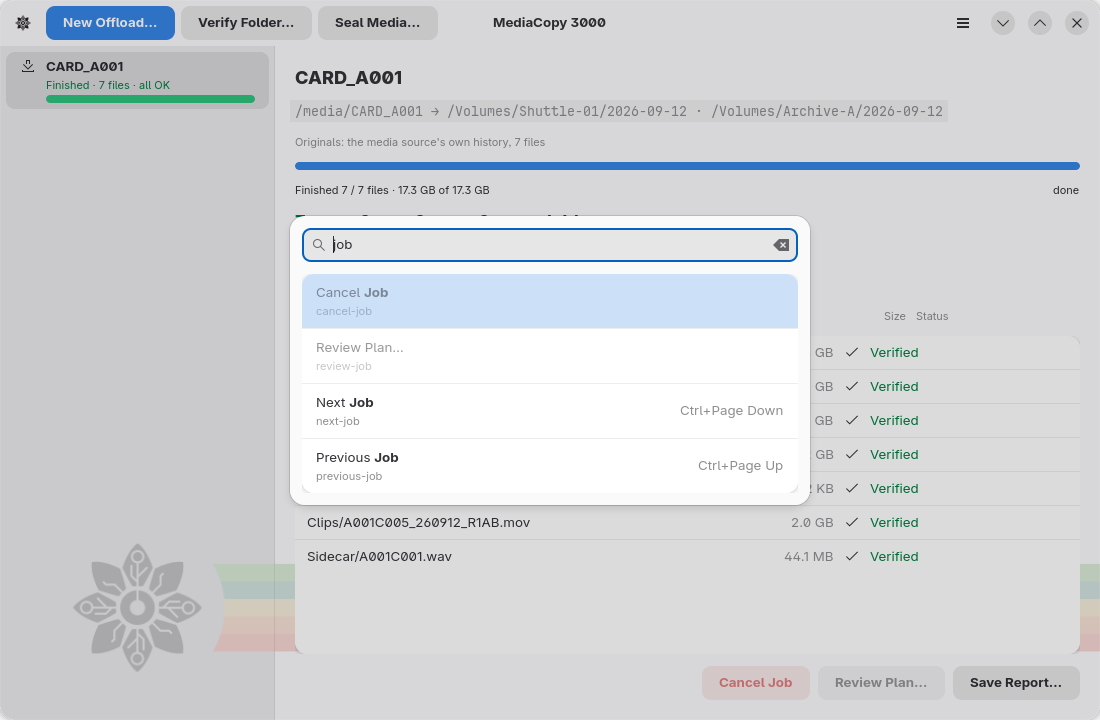
Ctrl+K opens a list of every command. Type to filter it. The palette reads the label and the short id under it, and it ignores case and accents. When the match is on the label, the letters you typed show in bold. Up and Down move the selection, Enter runs it, and Escape closes the palette. A grey row is a command that cannot run at this time.
In a dialog
| Key | What it does |
|---|---|
| Enter | Press the suggested button: Review Plan… in the offload dialog, Start on the plan sheet |
| Escape | Close the dialog. On the plan sheet this throws the plan away. |
Enter does nothing while the suggested button is grey.
Access keys
A dialog underlines one letter of each button. Alt and that letter press the button.
| Dialog | Button | Key |
|---|---|---|
| New Offload | Cancel | Alt+C |
| New Offload | Review Plan… | Alt+R |
| New Offload | Choose… | Alt+O |
| New Offload | Add Destination… | Alt+A |
| Plan | Back | Alt+B |
| Plan | Start | Alt+S |
| Stop the running job? | Keep Running | Alt+K |
| Stop the running job? | Stop and Close | Alt+S |
Without a key
Cancel Job and Clear Finished have no shortcut. Use the button in the detail pane, the menu item, or the command palette.